
Golden hour is the hour before sunset when light is low, warm and soft. It flatters almost every face, which is why it is the most copied look in portrait photography. AI image tools can recreate it, but only if the prompt says where the light comes from.
This Prompt Seen guide gives you three golden hour prompts. Each one names the direction of the light, the background and the clothing, because those three details decide whether the result looks like a real evening photo or a flat filter.
At a glance
- Look: Warm, low sun, soft shadows
- Works in: Google Gemini or ChatGPT with photo upload
- Best ratio: 4:5 for posts, 9:16 for stories
- Photo to upload: A clear, front-facing photo in daylight
The prompts
Prompt 1: Backlit walk in a wheat field
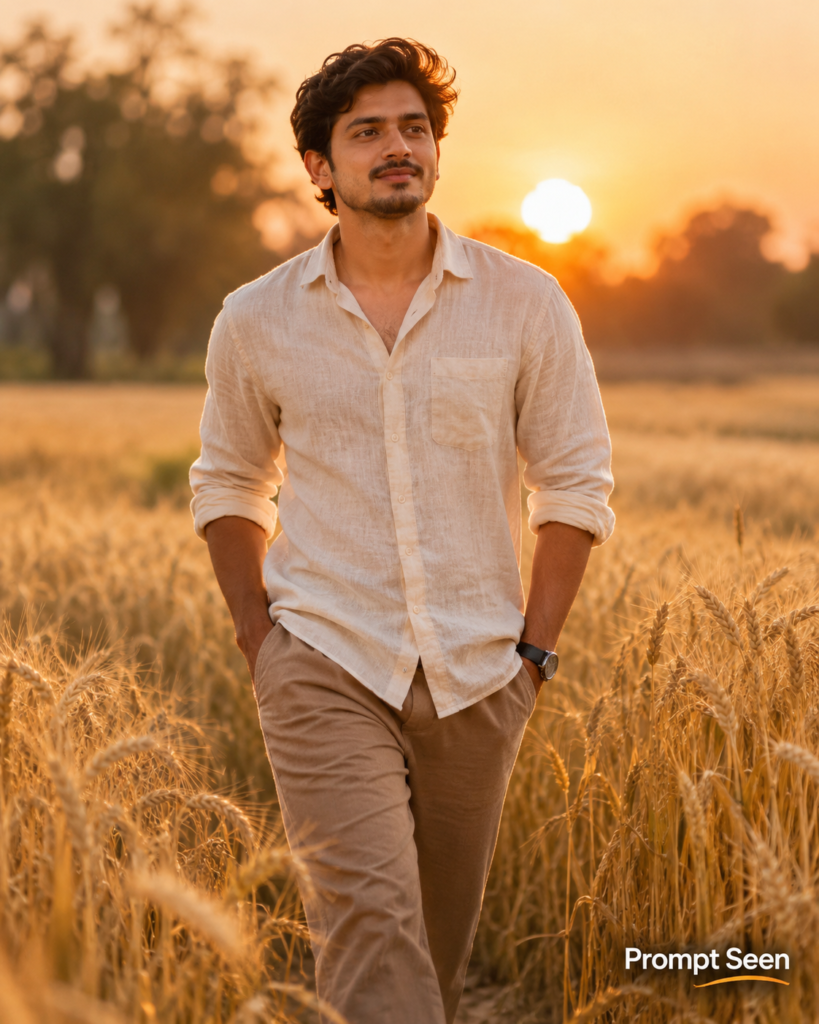
Create a realistic portrait of the person in the uploaded photo walking through a wheat field at golden hour. The sun is low behind them, creating a soft glowing rim of light on their hair and shoulders. They wear a cream linen shirt and light brown trousers. Shallow depth of field, warm tones, gentle film grain. Keep the face exactly as in the uploaded photo. No text, no watermark. 4:5 ratio.Why it works: The sun position (behind the person) does most of the work. It gives the rim light on the hair. The field is described as wheat, not just grass, so the background has a clear colour.
Prompt 2: Rooftop at sunset

Create a realistic portrait of the person in the uploaded photo standing on a city rooftop at sunset. Warm orange light falls from the left side of the frame onto their face. Softly blurred buildings and a pale pink sky behind them. They wear a dark denim jacket over a white t-shirt. Keep the face exactly as in the uploaded photo. 4:5 ratio.Why it works: Light from the left side gives the face gentle shape. The blurred buildings keep the focus on the person.
Prompt 3: Seaside bench at dusk

Create a realistic portrait of the person in the uploaded photo sitting on a wooden bench by the sea at golden hour. The low sun sits at the horizon in front of them, giving a warm glow on their face and a long soft shadow behind. Calm expression, hands relaxed, a light cotton kurta in off-white. Keep the face exactly as in the uploaded photo. 9:16 ratio.Why it works: Putting the sun in front of the person lights the face directly, which suits photos where you want a clear expression.
Why this look works
Golden hour is the short stretch after sunrise and before sunset when the sun sits low in the sky. The light travels through more atmosphere, so it turns warm and soft, and shadows become long and gentle. Photographers plan whole days around it because the same face looks kinder in this light than at noon.
The reason an AI tool needs help with this look is simple: if you only write “golden hour”, the model often paints an orange sky but leaves the face lit as if it were midday. The Prompt Seen prompts above fix this by saying where the sun is relative to the person, what colour the light is, and what the background does. When those three things agree, the picture looks like one moment in time.
You can see this in the example results on this page. In each one the warm colour comes from the same direction as the shadows, and that is what makes the pictures read as real evening photos.
Variations to try
Once one prompt works for you, change a single thing at a time. These Prompt Seen variations are the easiest places to start:
- Change the season: Replace the wheat field with a green paddy field, a snowy path or autumn leaves, and change the clothes to match. Keep the line about the low sun.
- Change the clothing colour: Warm light favours cream, white, olive and rust. Try a rust-coloured shirt in Prompt 1 and compare it with the cream one.
- Move the sun: Put the sun on the left, right, behind or in front. Each position changes how much of the face is lit, so test one at a time.
- Try a closer crop: Ask for a head-and-shoulders crop instead of a full body. Faces usually come out more accurate in a closer frame.
How to use these prompts
- Upload one clear front-facing photo taken in daylight.
- Paste one prompt, and send the photo and the prompt together in the same message.
- Check the face first. If it has changed, repeat the line about keeping the face exactly as in the uploaded photo.
- Change only one detail at a time (clothes, place or light) so you can see what made the difference.
Tips for a better result
- Match the clothing colour to the light. Cream and off-white take on warm light well; very dark clothes lose detail.
- Ask for “soft rim light” if the glow on the hair is too strong.
- Avoid asking for a sun and a sunset sky at the same time from different sides. Pick one light direction.
What goes wrong
The picture looks like midday, not sunset. The prompt did not name where the light comes from. Fix: Add “the low sun is behind the person on the right” or similar.
The face looks different. The reference photo was blurry or at an angle. Fix: Use a sharper front-facing photo and repeat the face line.
Hands look odd. Models find fingers difficult. Fix: Say “hands relaxed in pockets” or “hands out of frame”.
More mistakes to avoid
The sky is orange but the face is flat. The prompt named the sky but not the direction of the light. Fix: Add one sentence such as: the sun is low on the left and lights one side of the face.
Everything is too yellow. Too many warm words stack up. Fix: Remove extra words like golden, amber and honey, and keep one.
Shadows fall the wrong way. Two light sources were described. Fix: Describe a single sun position only.
Quick checklist before you generate
- My photo is clear and front-facing
- I named where the sun is
- I chose clothes that suit warm light
- I asked for the face to stay unchanged
- I checked the hands and the horizon line
Before you post
Use only your own photos, or photos of people who agreed. Say in the caption that the picture is AI-made.
Frequently asked questions
Which tool works best?
Both Gemini and ChatGPT can follow these prompts when you upload a photo. Try both and keep the result that keeps your face closer to the original.
Do I need a good camera?
No. A clear phone photo in daylight is enough.
Can I use a friend’s photo?
Only with their permission.
Should I say the picture is AI-made?
Yes. It is good practice to say so in the caption.
What time of day is golden hour?
It is roughly the first hour after sunrise and the last hour before sunset. The exact time depends on your city and the season.
Can I use these prompts with an old photo?
Yes, as long as the face is clear. A sharp, front-facing photo gives the best result.
Why does the result sometimes change my face slightly?
Image tools rebuild the picture from your photo. Repeating the line about keeping the face exactly as in the uploaded photo, and using a clearer photo, helps.
How is this different from a golden hour filter?
A filter only changes colour. These prompts also change the place, clothes and light direction.
More guides on Prompt Seen
If you enjoyed this guide, these Prompt Seen posts cover related looks:
Final word
Golden hour prompts work because they describe light, not just a place. Start with one prompt on this page and change a single detail each time.
PromptSeen is run by Rutik Soni. Each post is written around its own example images. Prompts give different results every time, so your picture may not match ours. Read how we work in the Editorial Policy, or write to support@promptseen.co if something is wrong.